
AI Summary
In 2026, selecting a website development approach requires balancing technical capability with specific business needs, primarily choosing between cloud-based builders, self-hosted systems, or niche platforms. Cloud-based builders like Squarespace and Wix offer user-friendly, “brochure-style” solutions with varying degrees of plugin support, while Webflow provides advanced design control for those with more technical expertise. In contrast, self-hosted content management systems (CMS) like WordPress offer unparalleled customization and data ownership but demand more responsibility regarding maintenance and security. Finally, niche solutions such as Shopify or HubSpot prioritize specialized functions like e-commerce or CRM over general content management, ensuring that organizations can align their choice with their primary operational goals.Finding the right approach for your website can be a challenging process. Selecting the right combination of technologies is a critical decision that needs to balance design, cost, flexibility, ease of use, and your technical capability. This post will outline three approaches that are available in 2026: cloud-based, self-hosted and niche solutions.
1. Cloud-based Website Builders
Squarespace, Wix, and Webflow
If you own a small business, have limited technical expertise and need a website that certifies that you are for real, then likely all you need is a brochure website to explain who, what and when you are.
While self-hosted solutions like WordPress have long been the industry standard CMS, cloud-based site builders like Squarespace, Wix, and Webflow have emerged as viable options, each catering to different skill levels and project requirements.
Squarespace
Squarespace offers a focused and uncomplicated interface that is ideal for users who prioritize ease of use and are interested in producing a simple, good looking “brochure” website. While it lacks a robust app store or extensive plugin system, it compensates with built-in functionality for selling products, scheduling appointments, accepting donations, and managing invoicing. However, its external extensions are largely limited to e-commerce and marketing.

Wix
Wix presents a more complex editing environment compared to Squarespace, but offers a much broader range of capabilities through its extensive app store. While these plugins provide significant flexibility, they can become pricey. Like Squarespace, Wix is capable of delivering high-quality, professional-looking websites.

Webflow
For those seeking maximum control in this arena, Webflow stands out as a developer-friendly option that utilizes CSS concepts, such as flexbox and grid layouts, directly within its editing interface. This power comes with a steeper learning curve and added complexity compared to its competitors. However, the payoff is a user interface that allows for greater control—especially when compared to the sometimes clunky editing experience of Wix or Squarespace. In addition, Webflow has advanced features like “CMS Collections” which are similar to WordPress’ custom post type functionality. It also features an extensive app store. Like the other two, it is a strong choice for creating visually impressive sites.
2. Self-hosted Content Management Systems (CMS)



Using a self-hosted CMS like WordPress, Drupal or Joomla offers a great deal of control and opportunity for customization through large plugin libraries and the ability to create custom themes. You get full ownership of your data and the freedom to choose your hosting environment. These popular CMS’s often have large communities around them which provide abundant tutorials, documentation and third-party support. However, this freedom comes with responsibility – you’re on the hook for keeping up with CMS, plugin and theme updates (although some hosting providers can automatically handle this for you, like WP Engine) Also, since there are so many plugins available, some site owners can be tempted to install plugins that they don’t need, have duplicative functionality, or conflict with other plugins. With that said, if you need a professional web presence with room to grow, WordPress is a strong fit.
3. Niche Website Solutions
There are also niche website solutions, often cloud-based, that provide some level of CMS offering in addition to other primary functionality.
One example is Shopify, a popular e-commerce platform. Although its CMS functionality is limited, the e-commerce features are the primary focus and are excellent for businesses that primarily sell products – whether physical goods, digital downloads or subscriptions.
HubSpot is another example. Again, the CMS functionality is limited compared to competitors, but its primary offering is their customer relationship management (CRM) system and inbound marketing functionality.
Self-hosted versus Cloud-based CMS
Whether you choose WordPress or a cloud-based CMS like Wix or Squarespace, the experience of creating and managing your content will be similar. Both of these approaches offer visual editors that allow you to preview what your page will look like to visitors from the editor.
The biggest difference between traditional self-hosted CMS’s like WordPress and Drupal and CMS’s like Wix, Squarespace and Webflow is the level of customization that they allow for. With self-hosted solutions like WordPress or Drupal, you’re free to make almost any customization you can think of. If you choose, you can modify WordPress’ core behavior to suit your needs, create and install custom plugins, etc.
With Cloud-based content management systems like Wix, Squarespace and Webflow, each restricts access to aspects of your site’s inner workings in different ways. For example, you may not have the ability to customize the HTML in some situations, or you may not be able to add some particular functionality that may be necessary for your site.
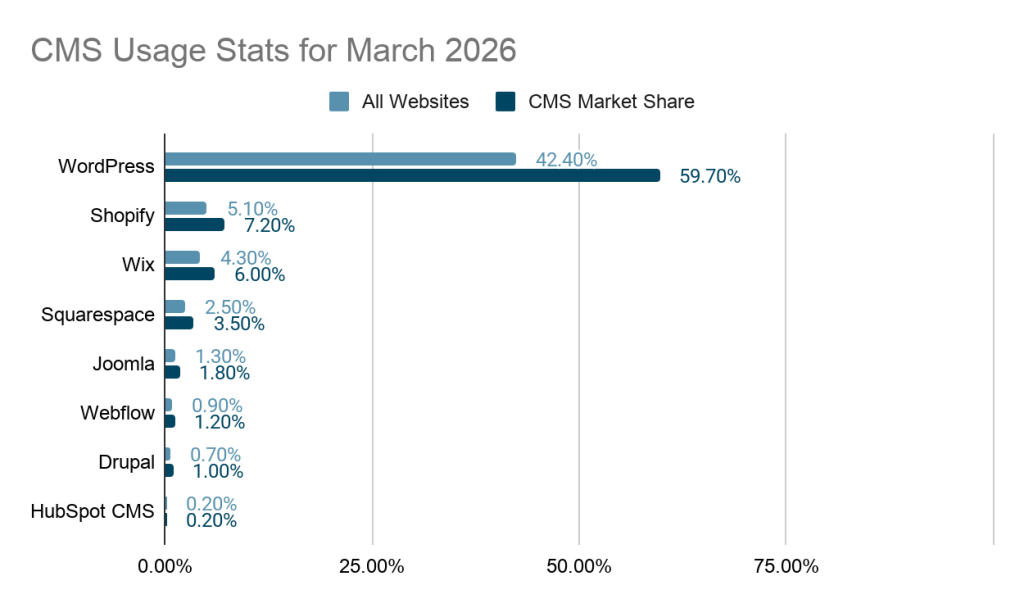
CMS Usage Stats
Here are some usage stats of the of the content management systems discussed in this article as of March 2026 (source: W3Techs)
Final Thoughts
The 2026 landscape for website creation offers a choice between simple user-friendly cloud-based builders, self-hosted platforms like WordPress for maximum customization, and niche solutions like Shopify or HubSpot for specific business functions like e-commerce or CRM.
Glossary
| Term | Definition |
| Cloud Computing | Internet-based delivery of computing services |
| Content Management System (CMS) | Software that allows users to create, edit and manage digital content on a website |
| Platform (Software) | A foundational software environment that allows other applications or services to be built upon it |
| Plugin | A modular piece of software that can be installed to extend the functionality of other software, for example a CMS, without the need to modify the core code |